為什麼需要檔案系統?
在嵌入式 IoT 專案中,常需要儲存:
- 設定檔(Configuration):WiFi SSID/密碼、感測器閾值、校準參數
- 網頁資源:HTML、CSS、JS 檔案(給 Web Server 用)
- 資料記錄:感測器歷史數據、事件日誌
- 韌體更新:OTA 更新的暫存檔
EEPROM 只能儲存少量資料且壽命有限(~10萬次擦寫)。SPIFFS 和 LittleFS 是 ESP32 上最常用的嵌入式檔案系統,讓我們能在 SPI Flash 上像操作 SD 卡一樣讀寫檔案。
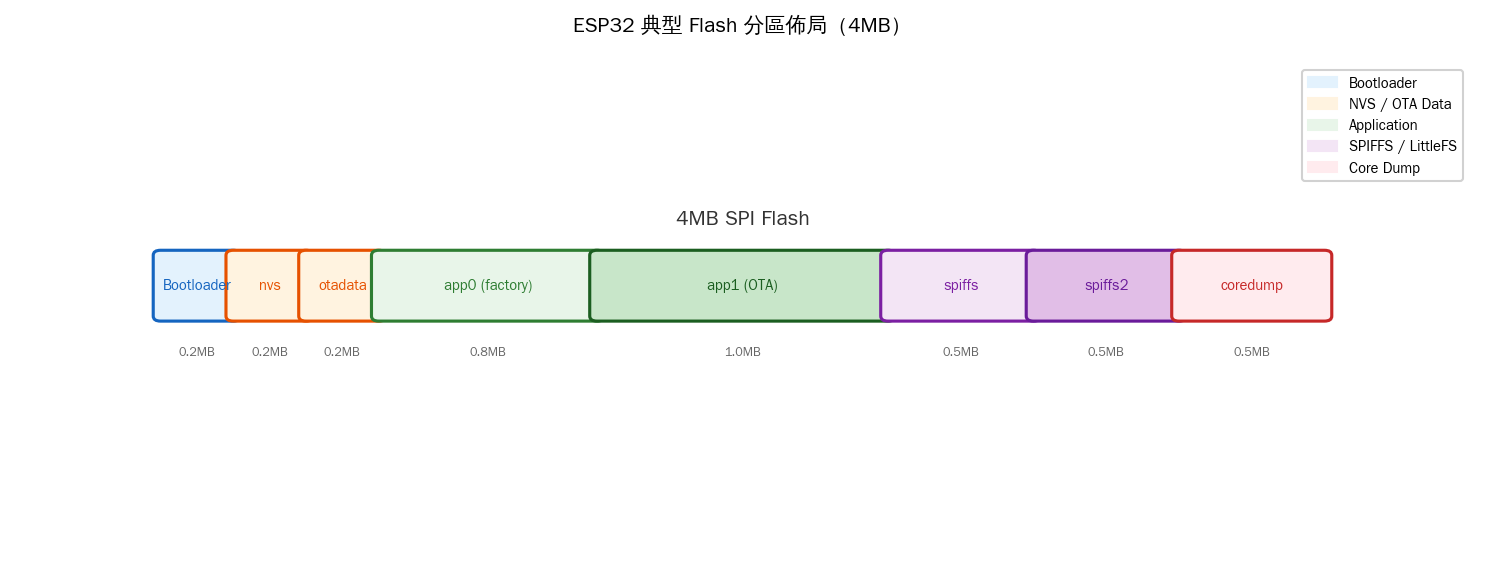
SPI Flash 硬體原理
ESP32 使用的 SPI Flash 晶片(通常是 Winbond W25Q32 或同級)透過 SPI/QSPI 介面與 SoC 通訊:

讀取操作很簡單:CS 拉 Low → 發送 Read 指令 (0x03) → 發送 24-bit 位址 → Flash 回傳資料。但寫入就複雜多了:

SPI Flash 的特性:
- 寫入前必須擦除:不能直接將 1 改為 0,只能將已擦除(全 1)的區域寫入
- 最小擦除單位 = Sector (4KB):無法只擦除 1 byte
- 最小寫入單位 = Page (256B):一次最多寫 256 bytes
- 擦除次數壽命:約 10 萬次(Wear Leveling 可延長)

SPIFFS vs LittleFS
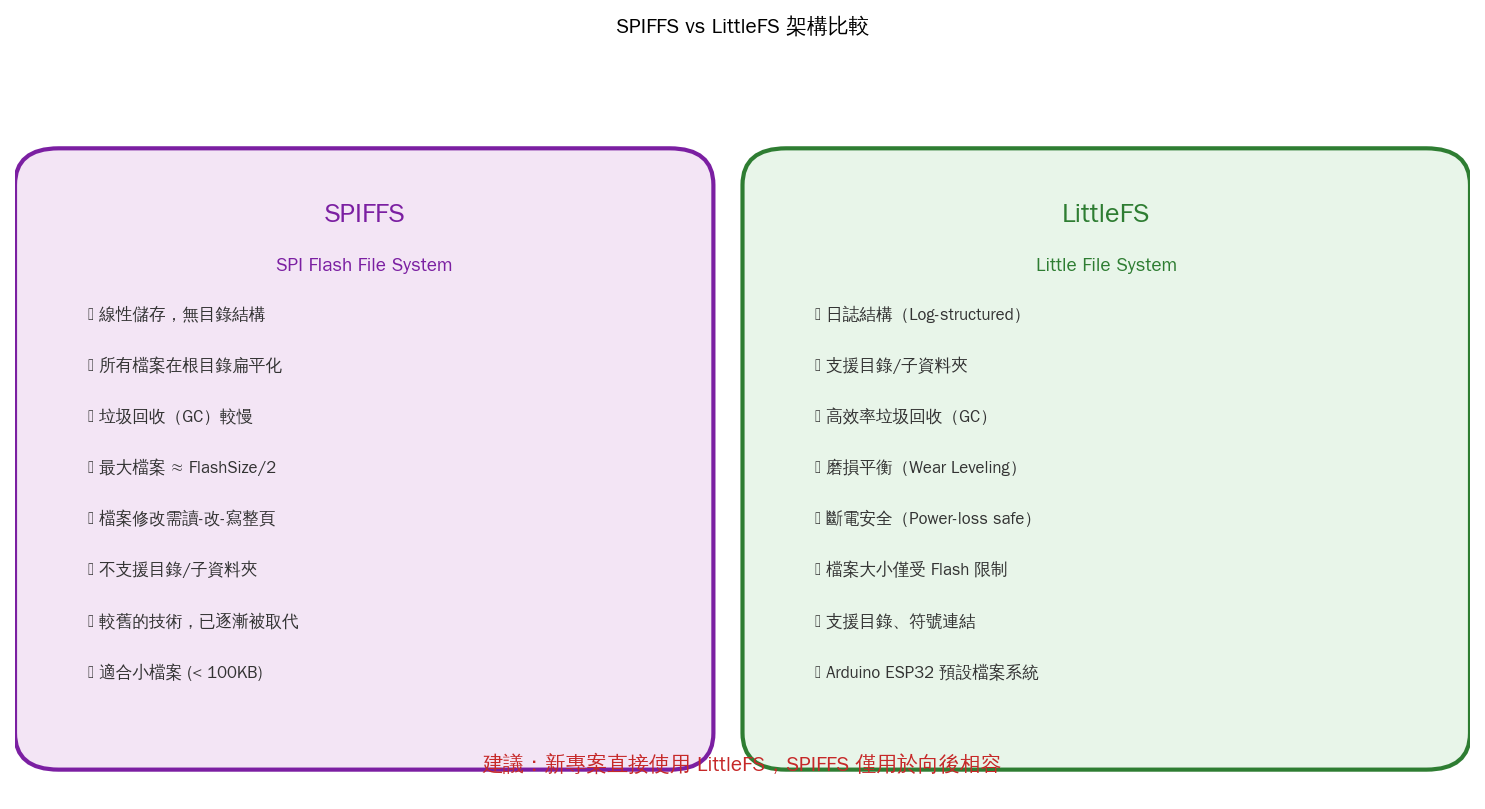
ESP32 Arduino Core 自 2.0.0 版起已將 LittleFS 設為預設檔案系統,SPIFFS 僅保留向後相容。新專案請直接使用 LittleFS。
ESP32 LittleFS 實作
1. 安裝與設定
在 Arduino IDE 中,需先安裝 ESP32 檔案系統上傳工具:
- 下載
ESP32FS或 PlatformIO 的Upload Filesystem Image - 在專案中建立
data/資料夾存放要上傳的檔案 - 使用 Tools → ESP32 Sketch Data Upload 上傳
2. 基本檔案讀寫
// ESP32 LittleFS - 基本檔案讀寫範例
#include "LittleFS.h"

void setup() {
    Serial.begin(115200);

    // 掛載檔案系統
    if (!LittleFS.begin(true)) {  // true = 格式化如果掛載失敗
        Serial.println("LittleFS 掛載失敗!");
        return;
    }
    Serial.println("LittleFS 掛載成功");

    // 寫入檔案
    File file = LittleFS.open("/config.json", FILE_WRITE);
    if (file) {
        String json = "{";
        json += "\"ssid\":\"MyWiFi\",";
        json += "\"password\":\"secret123\",";
        json += "\"interval\":300";
        json += "}";
        file.print(json);
        file.close();
        Serial.println("config.json 已寫入");
    }

    // 讀取檔案
    file = LittleFS.open("/config.json", FILE_READ);
    if (file) {
        Serial.println("--- config.json 內容 ---");
        while (file.available()) {
            Serial.write(file.read());
        }
        Serial.println();
        file.close();
    }
}

void loop() {}
3. 列出所有檔案
// 列出 LittleFS 根目錄所有檔案
void listFiles(const char* dirname = "/") {
    File root = LittleFS.open(dirname);
    if (!root || !root.isDirectory()) {
        Serial.println("無法開啟目錄");
        return;
    }

    File file = root.openNextFile();
    while (file) {
        if (file.isDirectory()) {
            Serial.printf("  [DIR] %s\n", file.name());
        } else {
            Serial.printf("  [FILE] %s (%d bytes)\n",
                          file.name(), file.size());
        }
        file = root.openNextFile();
    }
}
4. JSON 設定檔管理(ArduinoJson)
// ESP32 LittleFS + ArduinoJson 設定檔管理
#include
#include

struct Config {
    char ssid[32];
    char password[64];
    int  interval;     // 感測器讀取間隔(秒)
    float threshold;   // 溫度警報閾值
} config;

bool loadConfig() {
    File file = LittleFS.open("/config.json", FILE_READ);
    if (!file) return false;

    JsonDocument doc;
    DeserializationError err = deserializeJson(doc, file);
    file.close();

    if (err) {
        Serial.printf("JSON 解析失敗: %s\n", err.c_str());
        return false;
    }

    strlcpy(config.ssid,      doc["ssid"]      | "default",  sizeof(config.ssid));
    strlcpy(config.password,  doc["password"]  | "",         sizeof(config.password));
    config.interval  = doc["interval"]  | 300;
    config.threshold = doc["threshold"] | 50.0;

    return true;
}

bool saveConfig() {
    File file = LittleFS.open("/config.json", FILE_WRITE);
    if (!file) return false;

    JsonDocument doc;
    doc["ssid"]     = config.ssid;
    doc["password"] = config.password;
    doc["interval"] = config.interval;
    doc["threshold"] = config.threshold;

    serializeJsonPretty(doc, file);
    file.close();
    return true;
}
實戰:IoT 感測器資料記錄器
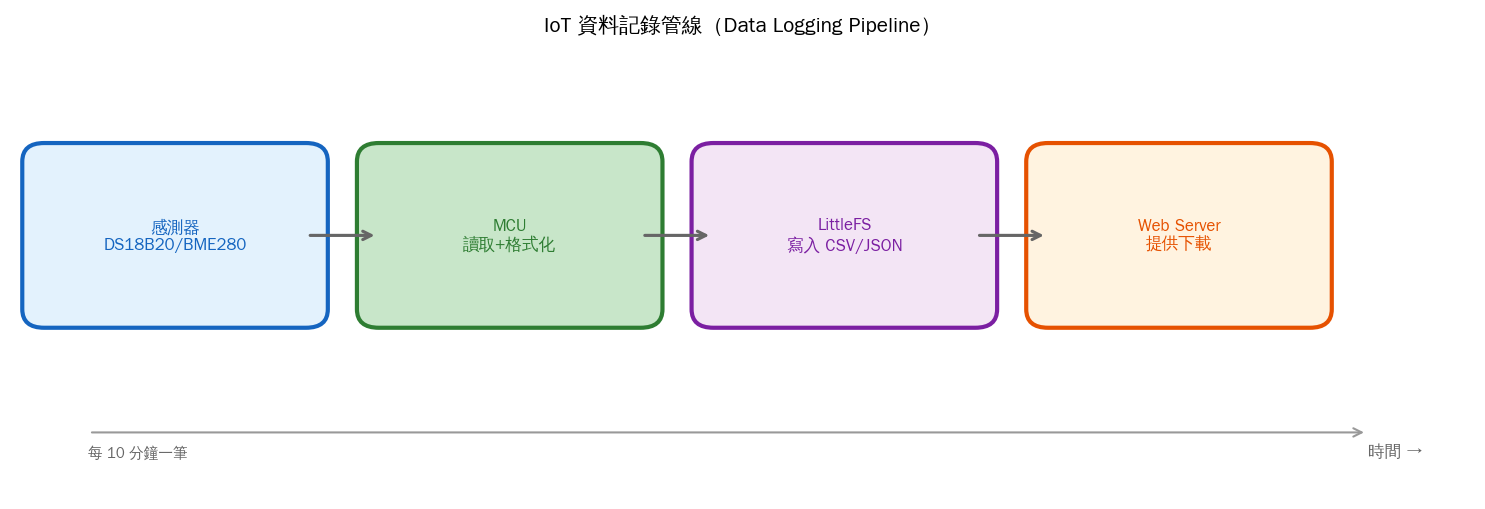
結合 DS18B20 溫度感測器與 LittleFS,每 10 分鐘記錄一筆資料到 CSV 檔,並提供 Web 介面下載:
// ESP32 - LittleFS 資料記錄器(含 Web Server 下載)
#include
#include
#include
#include
#include
// WiFi
const char* ssid = "YourSSID";
const char* password = "YourPassword";
// DS18B20
#define ONE_WIRE_BUS 4
OneWire oneWire(ONE_WIRE_BUS);
DallasTemperature sensors(&oneWire);
// Web Server
WebServer server(80);
const char* LOG_FILE = "/sensor_log.csv";
void setup() {
Serial.begin(115200);
// 掛載 LittleFS
if (!LittleFS.begin(true)) {
Serial.println("LittleFS 掛載失敗");
return;
}
// 初始化感測器
sensors.begin();
// 連接 WiFi
WiFi.begin(ssid, password);
while (WiFi.status() != WL_CONNECTED) {
delay(500);
Serial.print(".");
}
Serial.printf("\nWiFi 連線成功,IP: %s\n", WiFi.localIP().toString().c_str());
// 建立 CSV 標頭(如檔案不存在)
if (!LittleFS.exists(LOG_FILE)) {
File f = LittleFS.open(LOG_FILE, FILE_WRITE);
if (f) {
f.println("timestamp,temperature_c,temperature_f");
f.close();
}
}
// Web Server 路由
server.on("/", handleRoot);
server.on("/download", handleDownload);
server.begin();
}
void loop() {
static unsigned long lastLog = 0;
server.handleClient();
if (millis() - lastLog > 600000) { // 每 10 分鐘
lastLog = millis();
logSensorData();
}
}
void logSensorData() {
sensors.requestTemperatures();
float tempC = sensors.getTempCByIndex(0);
float tempF = tempC * 9.0 / 5.0 + 32.0;
File f = LittleFS.open(LOG_FILE, FILE_APPEND);
if (f) {
char buf[64];
snprintf(buf, sizeof(buf), "%lu,%.2f,%.2f\n",
millis() / 1000, tempC, tempF);
f.print(buf);
f.close();
Serial.printf("已記錄: %.2f°C\n", tempC);
}
}
void handleRoot() {
String html = "";
html += "";
html += "";
html += "";
html += "
";
    html += "
📊 IoT 感測器記錄器
";
html += "
";
html += "
感測器: DS18B20 溫度感測器
";
html += "
記錄間隔: 10 分鐘
";
html += "
記錄檔大小: " + String(getFileSize()) + " bytes
";
html += "
";
html += "📥 下載 CSV 記錄檔";
html += "
";
    server.send(200, "text/html", html);
}

void handleDownload() {
    File f = LittleFS.open(LOG_FILE, FILE_READ);
    if (!f) {
        server.send(404, "text/plain", "檔案不存在");
        return;
    }
    server.streamFile(f, "text/csv");
    f.close();
}

size_t getFileSize() {
    File f = LittleFS.open(LOG_FILE, FILE_READ);
    if (!f) return 0;
    size_t s = f.size();
    f.close();
    return s;
}
檔案系統大小計算
| Flash 大小 | SPIFFS/LittleFS 可用空間 | 建議檔案數 | 適用場景 |
|---|---|---|---|
| 4 MB | ~1.5 MB (partition.csv 設定) | 50~100 個 | 一般 IoT 專案 |
| 8 MB | ~4 MB | 200+ 個 | 含 Web 資源 |
| 16 MB | ~11 MB | 500+ 個 | 大量記錄/圖形資源 |
可透過 partition.csv 自訂分區大小:
# ESP32 partition.csv 範例
nvs,      data, nvs,     0x9000,  0x6000,
otadata,  data, ota,     0xf000,  0x2000,
app0,     app,  ota_0,   0x10000, 0x1E0000,
app1,     app,  ota_1,   0x1F0000,0x1E0000,
spiffs,   data, spiffs,  0x3D0000,0x200000,  ← 2MB 給檔案系統
coredump, data, coredump,0x5D0000,0x10000,
常見問題與除錯
Q: E (28) SPIFFS: mount failed, error: -10025
通常是 Flash 分區大小與程式碼不符。檢查 partition.csv 中的 spiffs 分區是否夠大。
Q: 檔案寫入後重開機就不見了
寫入後未呼叫 file.flush() 或 file.close()。LittleFS 使用 Write-back Cache,未 flush 的資料在斷電時會遺失。
Q: 如何確認用了多少空間?
// 檢查 LittleFS 使用狀況
size_t totalBytes = LittleFS.totalBytes();
size_t usedBytes  = LittleFS.usedBytes();
Serial.printf("總空間: %d bytes, 已用: %d bytes (%.1f%%)\n",
              totalBytes, usedBytes,
              100.0 * usedBytes / totalBytes);
總結
SPIFFS 和 LittleFS 讓 ESP32 能像一般電腦一樣管理檔案,是 IoT 開發不可或缺的技能。從設定檔管理到感測器資料記錄,從 Web Server 靜態資源到 OTA 暫存,檔案系統在各式應用中扮演關鍵角色。
新專案請直接選擇 LittleFS——它更快、更穩定、支援目錄結構,而且是 ESP32 Arduino Core 2.0+ 的預設選項。

文章評論